Posts

Showing posts with the label Computing

Year 3 Computing: Digital vs Non-Digital

Image
Year 3 have been learning about digital devices. Last week we thought about how they work in simple terms: Input - Process- Output. Today they carried out a task to decide which they preferred: digital or non-digital . Digital devices can help us do lots of things. Ideas included: entertainment finding out information calling people taking photos They painted a beautiful sunset! First, using paint and paper. Then, using a painting app called Freeform on the iPads. Both had great results.   However, after discussing their preferences and voting, the majority preferred real life painting ! Jorel: 'I preferred real painting because you could mix the colours to get the colour you wanted.' Catherine: 'I liked the real painting because it was hard to use all the buttons and pens on the ipad.' Mia: 'Using real paints is more creative!' Naomi: 'The iPad was good because if you made a mistake you could rub it out.' Qmari: 'I learnt the hard way that painting ...

๐Ÿ’ป Year 2 - PSHE Online safety

Image
๐Ÿ’ป With the recent news about the social media ban for under 16s, Year 2 were keen to discuss this and share their opinions! Our PSHE lesson was focused on how and why we use the internet so this real-life news linked perfectly! We watched BBC Newsround video listening to older children discussing their thoughts on the ban. Then we talked to our partners about what 'rules' we had at home when using devices. These included: time limits - must turn off devices at 6pm time limits - can only play online games at the weekend limited contacts - can only message family members educational - can play educational games We also talked about age limits as some children said they were allowed to use certain apps such as Facebook and Snapchat. The social-media ban is aimed at keeping children safe. This was a really important conversation to have - parents and carers please speak to your children about keeping safe online, monitoring their internet use and being available if they see someth...

Learning Real-Life Maths with Google Sheets - Year 5 and 6

Image
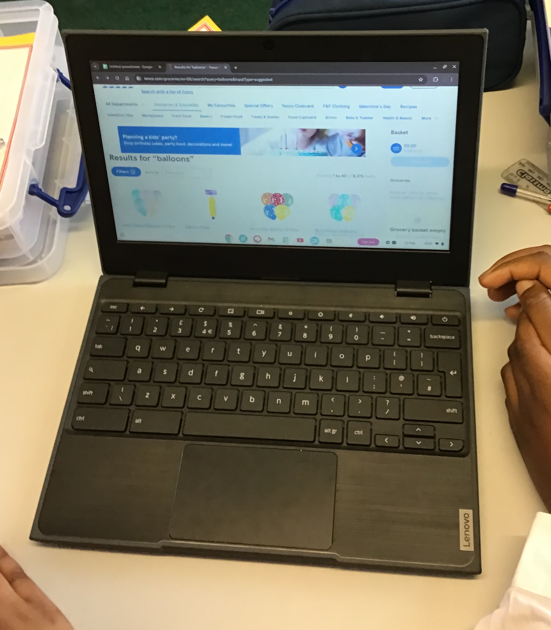
  Today, our Year 5 and Year 6 pupils took their maths learning to the next level by stepping into the role of party planners! Using Google Sheets, the children created their own budgets for a birthday party, combining digital skills with real-life maths. The lesson focused on helping pupils understand how to organise information using cells and how to use simple formulas to automatically calculate totals. After listing items such as food, decorations, entertainment, and party bags, the children worked out the costs and kept track of their spending within a set budget. This activity not only strengthened their understanding  of addition and money but also introduced them to the importance of financial planning and decision-making. Pupils quickly discovered that planning a party requires careful choices — should they spend more on decorations or save money for extra treats? As they worked, the children developed their confidence using Google Sheets, learning how spreadsheets...

Year 3 Safer Internet Day

Image
This week, our Year 3 pupils became young technology explorers as they celebrated Internet Safety Day by learning about Artificial Intelligence (AI). The children were excited to discover how AI is part of their everyday lives and more importantly, how to use technology safely and responsibly. We are incredibly proud of how thoughtfully Year 3 engaged with such an important and modern topic. Their curiosity, sensible questions and creative ideas show they are well on their way to becoming responsible digital citizens. Well done, Year 3... the future of technology is in safe hands! It is important to check where your information is coming from Alex

Exploring AI in Year 5 for Safer Internet Day

Image
We kicked off the morning by joining the BBC Live Lesson , which was broadcast straight from a safari park. The lesson tackled some big questions: Is AI a person? Can it be my friend? Should I trust everything it says? The children were quick to spot the difference. While a chatbot might use friendly language or even tell a joke, the students learned that it doesn't have feelings, a heartbeat, or a conscience. 'AI can tell 'lies' you can't always trust it and you can never trust it with your emotions.' - Yana  'Not all things you see online are true - it's important to double check information.' - Elodie  'It can replicate anything and it is only as good as the coder.' - Isabella  To see how AI "thinks," we turned our classroom into a science lab using Google’s Teachable Machine . The children learned that AI is essentially a "teachable machine"—it only knows what we tell it through data inputs . The challenge was simple: ...

Reception- Safer Internet Day 2026

Image
 Today was Safer Internet Day and had the focus on using AI and technologies around us.  We started by thinking about what the internet is.  ‘It makes our TV’s and electronics work’ Ethan ‘We have the internet at home’ Elijah ‘No internet means your telly doesn’t work ‘ Idrees Then we discussed why we use technology and which apps we know.  'Snapchat is yellow'- Macie  'I watch YouTube at home'- Logan Finally, we discussed Roo's new friend. She was described as being very smart, magical and powerful! But we didn't expect the friend to be Alexa!  We shared how using these devices can be useful- they can help us to answer questions or play our favourite music. Then we also thought about what they can't do- give us a hug, make dinner and be our friend.  ‘I have an Alexa’-  Logan  'An Alexa doesn’t have any hands' -Quinn ‘I ask my Alexa to play music'- Henry  ‘Alexa is actually not real people’ - Idrees  ‘It’s just a robot’ - Lydia

Safer Internet Day: Smart Tech, Safe Choices

Image
Safer Internet Day: Smart Tech, Safe Choices Today is Safer Internet Day and the theme is ‘Smart Tech, Safe Choices - Exploring the safe and responsible use of AI.’  As technology becomes an everyday part of children’s lives, it is important that we help them use it safely, responsibly and with confidence. Many primary-age children already interact with technology that uses artificial intelligence (AI), such as voice assistants, games, learning apps and online content recommendations. These tools can support learning, creativity and curiosity when used appropriately and with adult guidance. However, while AI can be helpful and engaging, it also presents risks that young children may not recognise. AI tools can sometimes provide inaccurate information, expose children to unsuitable content, or encourage them to trust what they see and hear too easily. Some platforms collect personal data, blur the line between what is real and computer-generated or present content in ways that feel ...

Computing and Music!

Image
Our next computing lesson has incorporated using musical instruments to demonstrate how music is created to a rhythm. We learnt about 'pulse' and clapped to a beat. Then we used coloured counters to create a rhythm patterm with our partner. This was then mimicked when using the Chrome Music Lab rhythm tool. We enjoyed making music and experiemnting with different rhythms and instruments - both real and digital! 

Year 2 Safer Internet Day

Image
Year 2 were wondeful at recalling prior learning about staying safe online! We had already discussed AI so we watched this informative video by Minecraft Education which explains how AI works in a simple way. To consolidate this further, we looked at a few short videos about AI, sharing photos and digital footprints. Mrs Griffiths explained that the internet has a memory that can remember what you search for and that this can be helpful but can also have its disadvantages too! For example, it can remember what you bought when online grocery shopping, so that you don't forget that all important chocolate bar next time! However, you can get pop-up adverts that can get annoying! We also considered how seding a photo to one person can sometimes mean that photo ends up with a complete stranger.  Sharing photos video Digital footprint video Then Year 2 made their own digital footprint by drawing around their own feet and writing the things they use the internet for, including: netflix r...

Year 6 Safer Internet Day

Image
To mark Safer Internet Day, our Year 6 pupils took part in an exciting live lesson alongside schools from across the country. This year’s theme, “Smart tech, safe choices – Exploring the safe and responsible use of AI,” gave children the opportunity to learn more about how technology is shaping their lives and how they can use it safely and responsibly. Throughout the session, the children explored how artificial intelligence works and discussed the many ways it is used in everyday life. They learned about the importance of thinking carefully when using smart technology, understanding that while AI can be helpful and powerful, it is important to make sensible and informed choices. The lesson encouraged the children to become confident, responsible digital citizens who know how to stay safe in an increasingly digital world. Well done to Year 6! For more information about Safer Internet Day visit: https://saferinternet.org.uk/safer-internet-day/safer-internet-day-2026 BBC Online Safety...

Year 6 - New Chromebooks!

Image
Today, Year 6 have been using our new Chromebooks as part of their IPC topic, WW2: The Home Front . The children have been working with Google Sites to create their own websites, sharing information about the vital role women played during the Second World War. This exciting work has allowed pupils to develop their research, digital, and presentation skills while deepening their understanding of an important period in history. The Chromebooks have been generously funded by the PTA, and we would like to say a huge thank you to the PTA and our whole school community. Your continued support helps ensure we can provide the very best resources for our children’s learning.

Digital Music Year 2 ๐Ÿ’ป

Image
Our new Computing topic is all about making music! We listened to some of Gustav Holst's 'The Planets' and discussed how the music made us feel, and what instruments we could hear. Listen here Watch here Find out more here It was amazing to hear the opinions of the children; music is so personal, subjective and emotive. Responses included - calm, relaxed, victorious, energetic, peaceful, loud, sleepy and joyful. The children noticed that each 'chapter' of music was different: Mars - loud, strong, energetic Venus - peaceful, quiet, chilled This also got the children thinking about how the music was made and being played - a conductor directs the orchestra and there are different instruments being used to create different sounds and moods. Year 2 then had a chance to explore 'Chrome Music Lab.'  We will be working towards creating a piece of digital music after half term.

Online safety - Computing in Year 2

Image
Year 2 have been looking at digital media (photographs) in their Computing lessons this term. It has opened up some great discussions about asking permission before taking, editing or sharing a photo of somebody. Today they also thought about what they should do if something happened online, for example: a pop-up advert asking us to click on a link a friend request from someone we don't know a message saying we have won a prize, just enter our details to claim Year 2 were very savvy - they could spot the scams and the unreliable sources ! To consolidate their ideas and learning, they created mini-posters. Their posters explained what to do in different scenarios. It was very pleasing to see the children had a mature attitude towards the possible dangers and that they knew what to do if they were unsure, for example: tell an adult block log off play a different game click the X button to close the window Excellent work Year 2! Here are some of the mini-posters:

Say cheese! ๐Ÿ“ธ Year 2 - Computing - digital media

Image
๐Ÿ“ธToday Year 2 used the iPads to create digital media - photographs - whilst refining their computing skills. We talked about what devices can take photos (CCTV, smart phones, digital cameras...) and which devices can't (printers, USB sticks...).  The class were familiar with taking photos and selfies as this is part of our everyday modern lives! However, we were reminded that you should ask permission before taking someone's photo, and that you can delete photos if you are not happy with them. We also realised that sometimes action shots are blurry! Our challenge was to complete the 'photo bingo' card. Next we will be considering when it is more effective to take a landscape or portrait photograph.

Coding in Year 5!

Image
 This week Year 5 will be delving into the world of coding using micro:bits.  This tiny, codeable computer is a fantastic tool, and for our first project, we followed the classic Micro:bit lesson to turn it into a scrolling name badge.  Before we even touched the code, we learned a few key things: Algorithms: We discussed that computers are only as smart as the instructions they're given. These sets of instructions are called algorithms. Coding Language: We used Microsoft MakeCode, a block-based programming environment that lets us drag and drop code blocks—a great way to see how the logic of a program works! 'I have learned how to code and create an algorithm.' - Elodie  'I really enjoyed it, it was a fun lesson.' - Dominic  'At the start it was hard but once we had learned how to code it wa fun.' Bleu The children enjoyed exploring the coding options using the programming software and we look forward to the rest of our project this week!  Well done Year 5...

Terrific Touch Typing in Year 2

Image
Today Year 2 tried using the Chrome Books for the first time. They learnt important skills such as logging on, using the shift key to make a capital letter, using the space and enter keys and then the fun part...    The Dance Mat! They took their hands for a dance as they tried to get used to using the keyboard! Here is the BBC Dance Mat website we used.

Educational Psychologist Helpline

Image
๐Ÿ“ฃ NEW Booking System Now Live! ๐Ÿ“ฃ Educational Psychology Parent Helpline We’re excited to launch our new and improved telephone support service for families! ๐Ÿ’ฌ✨ ✅ Confidential, safe and supportive ✅ No referral needed – just book your slot ๐Ÿ—“️ Available on alternating Mondays and Tuesdays ๐Ÿ• 1:00pm to 5:00pm ⏱️ 25-minute appointments https://send.essex.gov.uk/search-support-groups-and-activities/educational-psychology-ep-parent-helpline ๐Ÿ“ž Please note: the previous helpline number is no longer in use.

Computing - Coding and Programming in Year 2

Image
 Today Year 2 had fun experimenting with our Loti-Bots! We talked about how coding is used in lots of everyday things, including traffic lights, mobile phones and video games. Then they had a try at giving instructions to make the Loti-Bots move, light up, spin and make noises! It was sometimes difficult  and frustrating to overcome challenges (fixing bugs, reprogramming to get the code right) but they persevered and even decided to race their robots!

Algorithm makers in Year 5

Image
This term we will be completing a unit of work on computer coding. Over the next few weeks the children will learn to programme a micro:bit using a coding programme called Microsoft MakeCode.  This week we learned what an algorithm is and how to programme the micro:bit to become a name badge with our name moving across the screen on a loop. The children created a script in their workspace in the programme and placed the code together.  'An algorithm is like a list of instructions for a computer.' - Shakira  'It was fun learning to programme a micro:bit.' - Raveena  The children will be learning to develop their code as the weeks progress.  'I really enjoyed coding my name and learning what an algorithm was.' - Ivy  'I've learned a lot today and I will try and use it at home too.' - Dom 

Year 6 Computing - Google Sheets

Image
This week, the children took on an exciting challenge – planning and budgeting for a birthday party using Google Sheets! Working in pairs and within a fixed budget, they got to flex their creativity while learning valuable computing skills. By collaborating on Google Sheets, the children practiced data entry, learned to use formulas for calculations, and explored different ways to organise and present information. They compared prices, calculated totals, and made decisions on where to save or splurge to stay within budget! It was fantastic to see them engage in such a practical and fun learning experience!